Seasoned Broker Onboarding Page
Welcome to WEBREALTY: Building Your Business for Success
You may already have years of real estate experience, extensive education, and a track record of working with buyers and sellers. We’re excited about the possibility of helping you take the next step in your career with the WEBREALTY Team. Whether you’re looking for a fresh start, a more profitable business model, or the support and structure to reach your next level of success, we believe our platform offers an opportunity worth exploring.
While your experience is an asset, success at WEBREALTY begins with understanding how we do business. Our systems, resources, marketing strategies, and business practices are designed to work together to help you build a productive, sustainable, and profitable real estate business. The training available on this website will introduce you to that framework and show you how to put it to work.
Think of it as building a home. Your experience and skills provide valuable building materials, but a successful structure still requires a sound plan and a strong foundation. These courses will help you understand the tools, processes, and strategies available to you at WEBREALTY so you can build your business with purpose and make the most of the opportunities ahead.
Your first step is to become familiar with the WEBREALTY platform and the resources available to you. We recommend allowing two to three weeks to work through the Basic Training onboarding courses before moving on to Advanced Training. Each course has been organized in a specific sequence to build your understanding of our approach and help you develop a clear plan for your business. Take the time to work through the material thoroughly, even when some concepts are familiar. The goal isn’t simply to complete the courses; it’s to understand how to apply our systems and resources effectively within your own business.
If you have an existing client or an opportunity arises while you’re completing the training, we encourage you to move forward. Please keep us informed so we can help you navigate any WEBREALTY-specific systems, procedures, or requirements that may apply.
Our team is here to answer questions, provide guidance, and help you make the most of your transition to WEBREALTY. We also ask that you make completing the training a priority. Before being added to the company leads rotation, you must complete all required courses, including the practice transactions. This ensures you’re familiar with our procedures and prepared to handle the opportunities we provide.
We recognize the experience you bring to the team, and our goal is to help you build on it. Take advantage of the training, tools, and support available to you. By combining your professional experience with the WEBREALTY platform and a well-defined business plan, you’ll be better positioned to increase productivity, strengthen your client relationships, and build the successful real estate business you’re working toward.
We’re glad you’re considering WEBREALTY, and we’re here to help you make the most of this opportunity.

Advice from over four decades in the real estate sales business
By: Doug Burger
Needed Information
Please provide us some personal information so we can start integrating you into our systems.
Providing your vehicle information is an important part of our commitment to agent safety. In the unlikely event that assistance is needed while you're out showing properties, having this information on file allows us to provide identifying details to the appropriate authorities if necessary.
It's best to take these steps in order. You can click on each one to go to the instructions.
Your form entry has been saved and a unique link has been created which you can access to resume this form.
Enter your email address to receive the link via email.
The 8 Steps to Re-starting Your Career as a Successful Real Estate Broker
STEP 1
Get Your Professional Marketing Photo
Please provide a high-resolution photo that can be enlarged to approximately 12 × 16 inches without losing image quality.
Choose a photo with a background that contrasts with both you and your clothing. Our team will remove the background in Photoshop, so good contrast helps us achieve the best results.
Below are examples comparing amateur and professional photography. Your headshot is a key part of your marketing and often helps form a potential client’s first impression of you. Choose a photo that presents you as both professional and approachable.

REALLY Bad - Not approachable, obviously an amateur photo of low resolution, and the shoulders are cut off. Looks like a mug shot or someone in a police lineup.

Not Great - Not approachable and background can't be taken out around the hair.

Pretty Good - Looks approachable and background was easy to take out around the hair. Not full length, however, so doesn't allow for maximum flexibility for promotions.

Good - Looks approachable, casual looking, and background was easy to take out. Full length allows for any perspective from just a head shot all the way to full length.

Good - Looks approachable professional looking, and background was easy to take out except for the hair. Full length allows for any perspective from just a head shot all the way to full length.

Good - Looks approachable, professional looking, and background was easy to take out. Full length allows for any perspective from just a head shot all the way to full length.
STEP 2
Once you let us know you’re ready to move forward, we’ll send you the Independent Contractor Agreement and our Policies and Procedures for review. If you have any questions, please reach out so we can provide clarification.
After we receive your completed documents, we’ll submit your affiliation with WEBREALTY through the Washington State Department of Licensing (DOL) website. You’ll then receive an email from the DOL asking you to confirm your decision to join our firm.
Once the affiliation process is complete, we’ll notify you that you’re officially part of the WEBREALTY Team!
Join the WEBREALTY Team
CONGRATULATIONS!
STEP 3
Provide Us Your Photo and Other Information
By this stage, you may have already submitted your professional photograph(s). If not, please provide them now so we can move forward with your onboarding.
With your state license number and NWMLS LAG number available, you’re ready to complete this form and submit the remaining information we need. Once we receive your completed form, we’ll begin setting up your systems, tools, and resources so you can get started with WEBREALTY.
Step 4
Building Your Personal Brand

Branding is an important investment in building a successful real estate business. A consistent, recognizable brand helps consumers identify and remember a company across property signs, building signage, and marketing materials. That’s why WEBREALTY invested in having professionally designed company logos that create a cohesive, recognizable identity.
As an independent contractor, you’re also building your own business and personal brand. To help you establish your identity while maintaining a consistent connection to the WEBREALTY brand, we’ve adopted a unique PhotoLogo approach. Each PhotoLogo is personalized to the individual broker, creating a distinctive identity while maintaining the overall look and feel of the WEBREALTY brand.
To help you get started, WEBREALTY will order and cover the cost of a PhotoLogo package for you. This includes your basic PhotoLogo and a selection of logos in different metallic finishes for use across your marketing materials.
Your form entries has been saved and a unique link has been created which you can access to resume this form.
Enter your email address to receive the link via email. Alternately, you can copy and save the link below.
Thil link will expire in 30 days, afterwards your form entries will be deleted.
Please choose which type of calligraphy you would like for your PhotoLogo from the dozens of choices they have at photologo.co/gallery. Once you’ve settled on one, right click on it, save it to your computer, and then email it as an attachment to onboarding@webrealtyteam.com. We will then order your PhotoLogo package.
Step 5
Your Promotional Background Banner
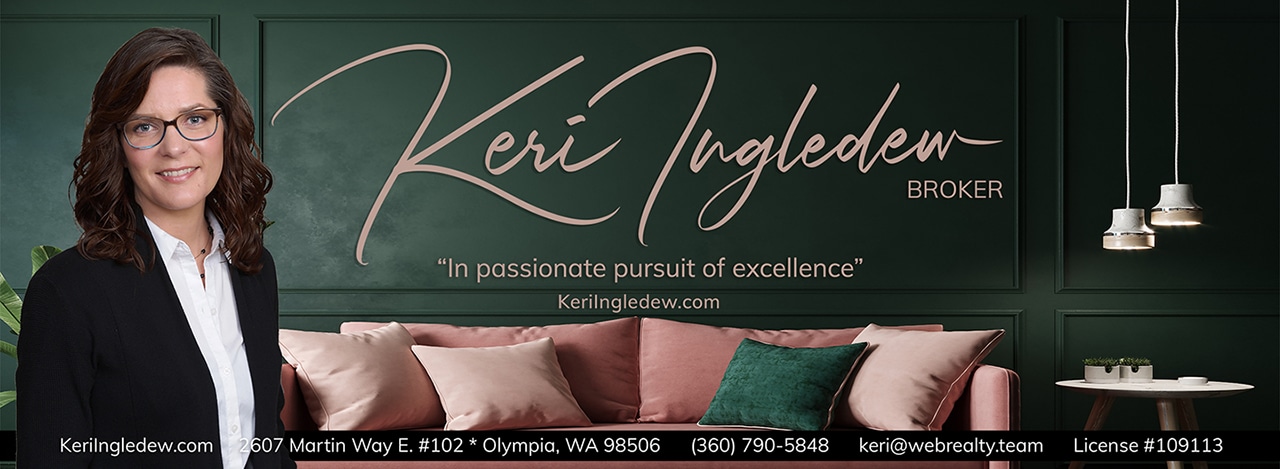
Your promotional background banner helps create a professional first impression and introduces you to potential clients before you’ve even met. Whether you’re new to real estate or a seasoned broker, the right banner helps establish a polished, professional presence.
We offer a selection of approximately two dozen banner designs. Once you’ve made your selection, we’ll customize it with your photo and PhotoLogo, then install it on your Facebook business page and personal website.
The page you will be taken to is very large, due to all of the large images. It will take a minute or so to load, but will eventually come up!
STEP 6
Order Supplies
We assume you already have a car, a cell phone, and a computer. The following are marked as either mandatory, suggested, or optional.
1. Business Cards (MANDATORY) – Your promotional banner helps you make a professional first impression while showcasing your unique identity and personal brand. Choose from approximately two dozen designs. We’ll customize your selection with your photo and PhotoLogo, then install it on your Facebook business page and personal website.
2. Signs (OPTIONAL) – Choose from approximately two dozen promotional banners to showcase your unique personal brand and make a professional first impression. Even if you’re new to real estate, your banner can help you present yourself as an experienced broker. The goal is to build name recognition so the public starts saying, “We see their signs everywhere!” Consistent exposure to your photo and name helps make you memorable. The office also maintains a supply of generic signs for your use. We’ll add your photo and PhotoLogo to your selected banner, then install it on your Facebook business page and personal website.
3. Supra iBoxes (SUGGESTED) – NWMLS requires its approved lockbox model for listings that use a lockbox. Having one available can save you time if a client is ready to list their property on short notice. New lockboxes purchased through NWMLS can be expensive, with the last price we recall being around $140 each. You may be able to find used lockboxes on eBay, Craigslist, or similar sites for approximately $30–$80. As your business grows, you may find it helpful to have one or more lockboxes on hand. It’s worth keeping in mind as you prepare for future listings!
STEP 7
Let's Get Started with Your Training
Welcome to the WEBREALTY Team! Now that your affiliation is in place, we assume you have an active real estate license and NWMLS membership. Your business cards have been ordered or are in the process of being ordered, and we’ve received your photo and other information to begin setting up your systems and building your websites.
You’re now ready to begin onboarding training. These courses will familiarize you with WEBREALTY’s systems, tools, and resources and show you how to use them effectively to manage your business, serve your clients, and close more transactions.
Let’s get started!
Use this checklist form to keep us and you apprised of your progress.
As you work through the training, check off each item as you complete it. To save your progress and return later, click “Save Your Progress and Resume Later” at the bottom of the page and enter your email address. You'll receive a link that takes you back to this page with your completed items preserved.
Once you've completed all the courses, submit the completed form. We'll then contact you to schedule a meeting to discuss your next steps with WEBREALTY!Your form entry has been saved and a unique link has been created which you can access to resume this form.
Enter your email address to receive the link via email.
STEP 8
Congratulations - you are now ready to actually start working as a real estate broker!
Let us know you are ready to move forward by clicking on the arrow, below. It will take you up to where you will fill in your name and click the red “I’ve Completed Everything” button. That will let us know you are ready to move forward with your new career.